bookmark_borderquindip: accessing grouped values (checkbox/radio groups)

I was trying to get the selected values from a check box group, but I failed miserably…

Almost when I gave up I got an error and then I found this site:
the XPages Extensibility API Documentation

via the class XspSelectManyCheckbox I then figured I had to search for the JSF API.

There I found this:
java.lang.Object[] getSelectedValues() 
Return the currently selected values, or null if there are no currently selected values.

which basically means:

getComponent(“myCheckBoxGroupID”).getSelectedValues() will return an ARRAY!!! checkout the [] at the end the object.

so finally it was easy to parse the selected values:
var valueArray = getComponent(“myCheckBoxGroupID”).getSelectedValues();
// valueArray[0] contains the first value
// valueArray[1] contains the second value etc.

can you believe it how stupid I am? and how relieved to finally have found a way to read the selected values with SSJS?

bookmark_borderquindip: how to make extension library tooltips work properly

It’s really simple:

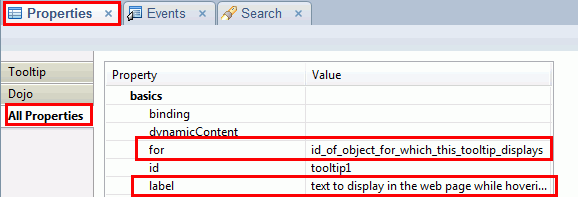
Drag’n drop a tooltip control from the extension library controls onto your page and set the appropriate properties:

XML source code:

<xe:tooltip id=”tooltip1″ for=”id_of_object_for_which_this_tooltip_displays” label=”text to display in the web page while hovering the target object”></xe:tooltip>

Result:

The only thing left is to add proper styling. As soon as I have themes working the way I require I will post more on this here

bookmark_bordercreating curved arrows in Illustrator (tutorial)

For my studies I had to create a nice little graphic with curved arrows and they should contain text in them. I thought Illustrator might be the tool to use. But admittedly I am not a hard-core Illustrator user and hence I had to dig a bit to find out more how to do this…

I found several suggestions but then at last I figured the most easy way is like this:

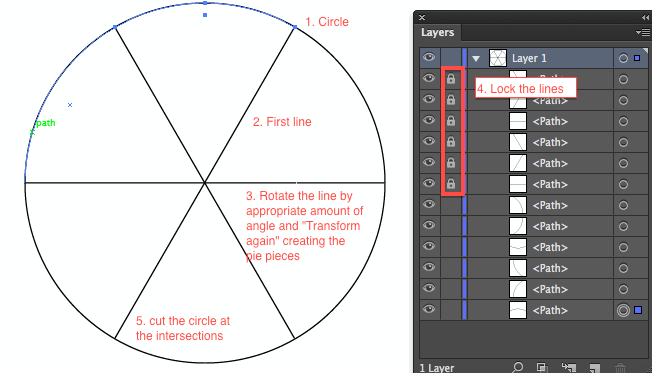
  1. Create a circle
  2. Divide the circle into how many parts as you need arrows around it:
    1. Add a line from center of the circle to its circumference
    2. Rotate that line, create a copy, with the rotate tool by the amount of angle you need, pay attention that the rotating center is put onto the center of the circle, do this by (on the mac) <option>clicking the center of the circle, then add the angle and click the copy button
    3. (on the mac) press <command>d to repeat (Transform again) until the circle has as many “pie pieces” as you need
    4. cut the circle with the scissors tool on the intersection points of the lines with the circle, to make this easier you may first “lock” the lines in the layers palette
    5. remove the lines again
  3. select all bows and add an arrow brush to your liking
  4. tweak the arrows in width: use the “Options for selected objects…” under the brushes palette menu and the width tool to adjust the arrows to your liking
    See Tutorial on the “variable width profile”
Screenshots:
Width tool to adjust the path width of the arrows

bookmark_borderquindip: debugging java in xPages made simple (four steps)

for some of you this might be the almost perfect XMas gift from me.

I finally figured how to debug Java code in an xPage application, and it’s DEAD SIMPLE…

if only more people would blog about it…

so here is how:

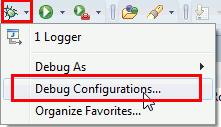
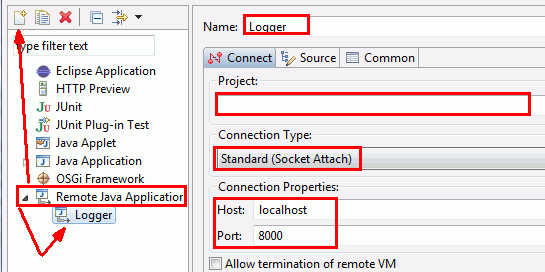
1. Create a debug configuration. The debug button might not always be visible, you will see it definetely by switching to the Java perspective.

2. add those 2 lines to your notes.ini and restart your notes client/designer
JavaEnableDebug=1
JavaDebugOptions=transport=dt_socket,server=y,suspend=n,address=8000
3. set any break point
4. do anything on an xPage which goes to Java, say using a Managed Bean or call a method from a normal Java class and voilà the debugger activates and you can check your code..
Most probably the first attempt will result not result in actually seeing code… you might get this result:
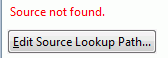
don’t desperate, click the button and then add your project and you will see your code… 
I wonder why IBM does not promote this VERY VERY VERY publicly… you have to again.. by accident stumble accross a video from Niklas Heidloff (kudos to him) 
this will save me soooooooooooooooooooooooooooooooooooooooooooooooo many headaches!!!

bookmark_borderquindip: prevent SameTime windows popping to the front

do you use SameTime? we use it a lot!
are you annoyed when someone sends you a message and the window pops to the front while you are typing something somewhere? I am!

here is the solution:

the setting “Bring chat window to front” is VERY hidden! You have to select the one-on-one chat notification to actually see that property!

bookmark_borderquindip: make accessing events/properties faster

Are you annoyed having to click x-times to get to your properties/events?

I am…

but how about this:

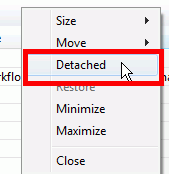
Detach the properties and events views and place them on a separate monitor so that you always have them available. I use an external screen and have the properties/events views detached on my internal LCD.

right click header of the view in designer and select “Detached”

This way I don’t bother resizing the panel on the bottom every 10 seconds. I click a field or any other element and then I turn my head to look at my secondary screen and have immediate access to all my properties/events I need…

this would be even cooler if it would work with <alt><tab> but it doesn’t! (->IBM: do you listen/read?)

bookmark_borderquindip: more mysteries about scoped variables solved

I don’t know about you.. I was for quite some time not quite getting the hang on “requestScope” and “viewScope” variables.

I did understand the “sessionScope” and the “applicationScope” variables.

after a few weeks of playing around with xPages, getting quite deep into JSF  framework etc, I had today finally (maybe only to me) a stupid revelation:

why a requestScope and a viewScope variable is called this way, and thus understand properly how it works

requestScope
Say you have a webpage open and you now click a button (ie. to save a document). The page (or parts of it) are sent back to the server (mostly via post, sometimes via a get HTTP request). When you in this button now set a requestScope variable you can actually use this value in the next page to be opened. I personally will use this to detect which view is most likely to be opened after a document has been submitted.

There is a little tweek to be made to get this working properly, see my other post.

viewScope
the viewScope is only valid as long as you stay on the same page! and if you know that an xPage is essentially (in JSF terms) a “view” you now also know the reason why it’s called a “viewScope” variable.

Use case why I would use  viewScope variable I don’t really have, but you could use it example to track how many times a user has refreshed the current webpage, say to switch between tabs etc. This could help you to track down bottlenecks in your layout.

bookmark_borderyour turn!

What are your most urgent issues regarding development with XPages?

let me know and write a comment.

Why I would like to know?

Well in the past few weeks when I tried to get the XPages framework for our company up and running, I spent countless hours doing research on the internet. And mostly I either didn’t find the information I was looking for at all, or it took me too long and I had to “syndicate” bits and pieces from various sources into a model which would work for me…

just take the example of “scoped variables”. In every XPage session/training I attended so far they tell you about the application/session/view/request scope variables.

No-one can really tell you exactly what the difference between view and request scope variable is.

and No-one can actually tell you how you get the request scope variables to work! Most XPage developers think they don’t work at all.

The reason for this is: we (yes, I include myself as well into that group of people) lack a good amount of necessary background knowledge how HTTP and JSF really work.

As soon as you get the chance to talk to certain people who know more about those topics, you start to realize things and suddenly the puzzle pieces fit together and form a quite nice image.

yours

Michael

bookmark_borderindip: inject JS into xPage dynamically

wow…

so… as you can see.. I was struggling lately a lot with how I could my validation work the way I want it…

I would like to setup some configuration documents where I can define certain criteria upon which my documents (ie. xPages) are validated….

so the simple (required/threshold/regex pattern) ones I got (at least as a prototype) working…

what was still missing was a way to inject “logic” into my validation via setup document..

With LotusScript you could simply use “Evaluate” and the code provided in the setup document would be “evaluated” (ie executed)..

But how the hell can you achieve something similar in xPages? Well working with JavaScript it would be a breeze… as there exists also an “eval” statement.

But as I was/am trying to get our framework working based as much as I can on Java language some other mechanism should be applied.

As I cannot just simply inject some code into a running (already compiled Java class) this would not be so easy. A colleague mentioned 3 methods.
One method I forgot, the other were: use an own class loader and load a full class on the fly. Might work, but I am 100% sure the Notes JVM security model would cough on it.
The third was to use EL expressions with an ExpressionFactory. Would have been a way to go…

But lazy as I was I was trying to figure out a way how I could inject JavaScript into running Java code.

and guess what.. I was lucky and figured it out:

here’s the code:

FacesContext facesContext = FacesContext.getCurrentInstance();
PageExpressionEvaluator eval = new ExpressionEvaluatorImpl(facesContext);

MethodBinding method = eval.createMethodBinding(
facesContext.getViewRoot(),
“#{javascript:var c = getComponent(“field1”);document1.replaceItemValue(“test”,c.getValue()); document1.save()}”,
null, null, null);

// other examples of JavaScript code to “experiment”
// “#{javascript:print(“hello world”)}”
// “#{javascript:return true}”

method.invoke(facesContext, null);

As you can see the interesting stuff is going on in the second parameter of the method createMethodBinding. There you can inject JavaScript code. Just enter your code into a button and then copy the relevant piece out of your xPage XML source code! In our framework this code will be read from the configuration document!

I admit.. the solution is “semi-optimal” cause I wanted to get rid of JavaScript as much as I can. But then hey: I don’t use those “formulas” very often, and for those rare cases I think I can accept the performance dip.

dip? indip? INDispensabletIP!

a side-dip: any ideas how I got the idea of how to get this working?

check this out:

in the package explorer view under Localxsp you will find the source code for all your xPages and custom controls! Just create a simple xPage with a button, add some JavaScript to the button and you basically get the code I posted above!