
View Hierarchy
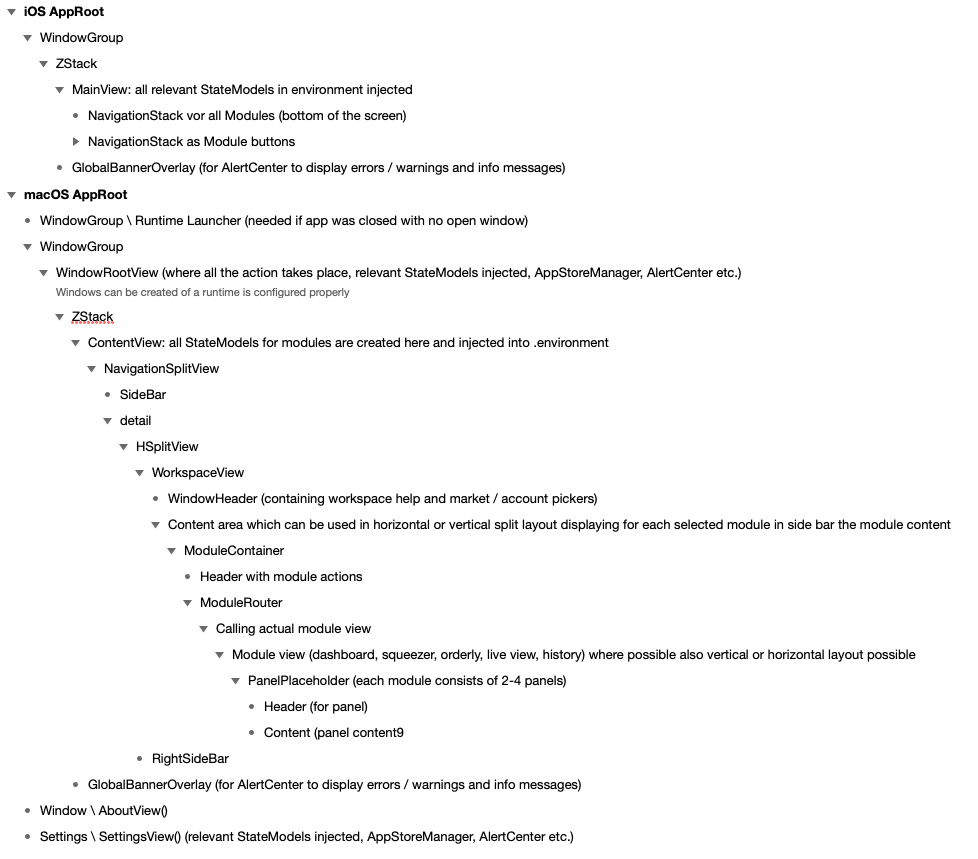
The hierarchy of views, especially for macOS is quite complex and deep, mainly due to almost automated creation of routes via a lot of enums and ForEach.
StateModels
I mentioned it in the last paragraph here already: do not go down the road of using @State variables and binding to other views excessively. It’ll bring you to refactoring hell.
Example: I use a right side bar, for help and module configurations. I wanted to bind <esc> key to release the content of the right side bar. Shortcut is bound in a high level view, as well as the closures telling what to do.
    .onAppear{
        workspaceModel.releaseSideBarAction = {
            snapshotsModel.setComparing(false)
            moveFundsModel.reset()
            historyModel.isFiltering = false

        }
    }
    .onExitCommand {
        workspaceModel.releaseSideBar()
    }

@Observable
final class WorkspaceStateModel {

    var releaseSideBarAction: (() -> Void)?


    func requestSideBarAccess(_ newContent: RightSideBarContent) -> Bool {
	// make sure right side bar displays currently requested content
    }

    func releaseSideBar() {
        content = .none
        showSideBar = false
        // closures from the various state models to ensure proper release of right side bar
        releaseSideBarAction?()
    }
}
If you use StateModels for all those values you need to make available between different views, then you might face the problem, that some places require a real binding. E.g. List selection: $selected
You can however bind the $selected value in an onChange modifier
Section{
    List(orders, id: \.id, selection: $selected) { order in

	// your list content
    }

} header:{
	// your section header content
}
.onChange(of: selected){ _, newValue in
    // update your StateModel with the $selected value

}